
Skip to content

Newspaper Text Animation with a Fixed Text Anchor

Create a newspaper text animation with one fixed word or phrase across changing paper layouts. Choose Paper style, preview the pacing, and export the finished clip.

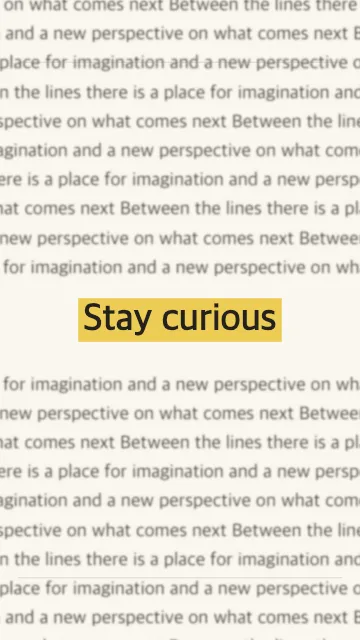
Newspaper-style text animation with highlighted fixed text

What is a newspaper text animation?

This editorial-style animation uses paper layouts as the moving background while one focal word or phrase stays easy to track. The changing type, body copy and page texture create movement; the fixed text supplies continuity.

This is closely related to the newspaper clipping effect and the newspaper text match cut seen in documentary-style edits. Our Paper style recreates that visual idea with generated layouts rather than uploaded newspaper scans.

How to create the newspaper clipping effect

Use one stable phrase, Paper style and controlled pacing

1

1. Enter the focal text

Choose the word, name or short phrase you want viewers to follow. Short text leaves more room for the surrounding editorial layout.

2

2. Choose Paper and tune the motion

Use the Paper style, pick 9:16, 1:1 or 16:9, then adjust duration, cuts per second, zoom and blur while the highlighted text stays anchored.

3

3. Preview and export

Check that the focal text remains readable at full speed, then export in 720p or 1080p as MP4, WebM or Auto.

Settings that make the highlight easier to read

Start with the cut speed. The faster the layouts change, the more important it is that the phrase stays short and the highlight remains visually dominant. If the word becomes difficult to follow, reduce the cuts per second before adding more effects.

Use blur to push the generated body text into the background and zoom to add motion without moving the focal anchor itself. For vertical TikTok, Reels and Shorts edits, choose 9:16 before you fine-tune the pacing so you are judging the same frame your audience will see.

Keep the paper movement behind the message

The newspaper look works when the page texture feels active but the highlighted phrase still wins the visual hierarchy. Judge the effect at normal playback speed, not on a paused frame. If the generated body copy becomes the first thing you notice, shorten the focal phrase, reduce the cut speed, or add enough blur to push that background type back.

Use New scenes when you like the wording but want a different paper arrangement. The focal text stays the message while the surrounding layout changes. For a vertical hook, check the 9:16 preview at phone size before export so the highlight remains legible inside the frame.

Where the newspaper text highlight animation works well

The effect is useful when one word needs to carry the beat: a person or place name in a documentary hook, a recurring term in an explainer, a product or idea in a social intro, or a short phrase that bridges into the next scene.

The exported clip is intentionally a focused asset rather than a full edit. Add voiceover, music, captions and other footage later in CapCut, Premiere, DaVinci Resolve, Final Cut or another editor that supports the downloaded format.

What this newspaper-style effect does not do

The Paper style generates editorial-looking text layouts around your focal phrase. It does not upload or animate real newspaper scans, build a custom masthead, reproduce a specific publication, create static clipping-letter typography, or turn arbitrary photos into paper cutouts.

If your goal is simply the rapid highlighted word across changing paper layouts, this workflow stays focused on that job. For the broader technique and export workflow, read the step-by-step text match cut tutorial.

Newspaper Effect FAQ

Create the newspaper-style text effect

Open the generator, choose Paper, keep the focal text short, and preview the motion before you export.